

If you are asking, “How do I choose the best digital display for a retail storefront?” start with your property, viewing distance, and communication goals, not the most impressive specification on a product sheet. The right display should be easy to see from the intended viewing area, support the type of content you want to show, fit your existing sign or proposed structure, and meet applicable local requirements.
For Northwest Florida retailers considering an outdoor digital sign, weather exposure, electrical needs, structural engineering, permitting, and future service access also need to be part of the decision.
Quick Summary
- Start with visibility. Consider where customers first see the sign, how far away they are, and whether they are walking or driving.
- Match pixel pitch and display size to viewing distance. More resolution is not automatically better if customers see the display from farther away.
- Plan for the complete sign system. The digital display, supporting structure, electrical service, content management, permitting, and installation all work together.
- Evaluate the site before choosing hardware. For Northwest Florida properties, local regulations and site-specific wind requirements can affect the final design.
Written by the Vintage Sign & Light Team
Vintage Sign & Light provides custom signage, Watchfire digital displays, site surveys, engineering coordination, permitting support, manufacturing, installation, and ongoing sign service for businesses throughout Northwest Florida and the Emerald Coast. The company identifies Watchfire digital displays as part of its current commercial signage offering and serves retail and multi-tenant properties across the Florida Panhandle.

7 Factors to Consider When Choosing a Retail Digital Display
Choosing the right digital display starts with understanding how the sign will function at your specific property. These seven factors can help you evaluate visibility, display specifications, content needs, site conditions, and installation requirements before selecting a system.
1. Start With Where Customers Will See the Display
The best digital display starts with the viewing environment. Before comparing resolution, pixel pitch, or other technical features, identify exactly where the display will sit and where customers need to read it.
For a retail property, that could mean customers approaching from a parking lot, drivers traveling along a commercial corridor, or visitors entering a shopping center.
The difference matters. A customer walking toward a storefront has more time to process detailed messaging. A driver approaching a roadside monument or pylon sign may only have a short viewing window. The display therefore needs to work at the actual distance and speed of the audience.
Consider:
- Distance from the road to the sign
- Typical traffic speed
- Direction customers approach from
- Landscaping, parked vehicles, poles, or other obstructions
- Sign height and viewing angle
- Nearby competing signs and visual clutter
- Daytime and nighttime visibility
For example, a retail center along a busy Florida Panhandle corridor may need an outdoor digital display incorporated into a monument or pylon sign. A display selected only because it looks impressive at close range could be poorly matched to how drivers actually see the property.
2. Choose Pixel Pitch Based on Viewing Distance
Pixel pitch should match how far away people will normally view an LED display.
Pixel pitch is the distance between neighboring LED pixels, usually expressed in millimeters. In general, tighter pixel spacing creates greater pixel density and supports more visual detail at closer distances.
That does not mean the smallest available pixel pitch is automatically the best choice.
If customers normally see your sign from farther down the road, paying for extremely fine resolution may not create a noticeable improvement at the actual viewing distance. On the other hand, a display positioned closer to pedestrians may need greater detail to keep graphics and text clear.
Avoid Choosing Resolution in Isolation
Pixel pitch should be considered together with:
- Display dimensions
- Viewing distance
- Traffic speed
- Letter and graphic size
- Amount of information on each message
- Viewing angle
- Overall budget
For example, imagine two retail properties using digital displays of similar physical size.
One display sits near a pedestrian entrance where customers stand relatively close. The other sits in a pylon sign viewed by motorists from farther away. Those displays do not necessarily need the same pixel pitch, even if both properties want to show similar promotions.

3. Make Sure the Display Can Handle the Viewing Environment
An outdoor retail display needs to be selected for outdoor use rather than treated like a standard indoor screen.
Northwest Florida businesses deal with bright daylight, heat, humidity, rain, storms, and other environmental conditions. An exterior digital sign therefore needs more than a good-looking screen.
The complete installation can involve:
- Outdoor LED display components
- Weather-protected housing
- Structural framing
- Electrical service
- Foundation or mounting systems
- Service access
- Proper drainage and ventilation considerations
- Engineering appropriate to the site
Brightness Still Matters, but More Is Not Always Better
Brightness affects whether digital signage remains readable as surrounding light conditions change.
However, choosing a digital display should not become a contest to find the highest possible brightness specification. The better question is whether the completed sign will remain clear and readable in the actual location during the hours it will operate.
Evaluate the site during daylight and after dark. Look at the sign from the same direction and distance your customers will use.
That approach gives you a better understanding of real visibility than choosing hardware from specifications alone.
4. Decide What You Actually Want the Sign to Communicate
Your content strategy should influence the display you choose.
Retailers often become interested in digital signage because content can change without producing a new physical sign face for every promotion.
A digital display can support messaging such as:
- Current promotions
- Seasonal offers
- Store announcements
- Events
- New products or services
- Hours or operational updates
- Brand messaging
- Community information
- Multiple scheduled messages
Watchfire’s Ignite OPx cloud-based content management software allows users to create, upload, schedule, and publish display content from an internet-connected computer. Its built-in editor supports images, video, and text, and content can be scheduled in advance. The types of motion or video content that may be displayed can depend on the display model and applicable local sign regulations.
Keep Roadside Content Simple
Having the ability to display more content does not mean every message should contain more information.
For roadside digital signage, clarity usually matters more than complexity. Customers should be able to understand the main message quickly.
A promotion with a short headline, recognizable brand element, and clear offer will generally make more sense for a passing driver than a presentation filled with small text.
For example, instead of trying to display an entire event description, a retail center might rotate concise messages for:
SUMMER SALE — THIS WEEKEND and NEW STORE NOW OPEN
The digital display provides flexibility, but the content still needs to match the viewing environment.

5. Choose a Content Management Setup Your Team Will Actually Use
The best digital signage system is one your staff can manage reliably after installation.
Before purchasing a display, determine who will be responsible for content updates.
Ask:
- Who will create new messages?
- How frequently will content change?
- Will updates happen from one location or several?
- Will messages need to be scheduled in advance?
- Does more than one employee need access?
- What image or video formats will your team typically use?
- Who will receive training on the system?
You do not necessarily need the most feature-rich platform available. You need one that makes sense for your business.
Watchfire’s Ignite OPx software provides cloud-based content management, allowing authorized users to create, schedule, and publish display content remotely. This can be particularly useful for retailers that regularly change promotions, events, specials, or announcements.
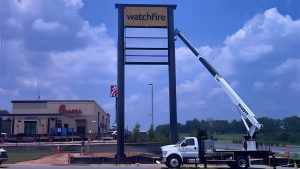
6. Consider the Entire Sign Structure, Not Just the LED Display
A digital display is one component of a larger commercial sign system.
This is especially important when adding digital signage to an existing monument or pylon.
Before assuming a new display can simply be installed into an existing structure, the sign company may need to evaluate:
- Existing cabinet dimensions
- Structural framing
- Foundation conditions
- Electrical capacity
- Display weight and mounting
- Ventilation
- Access for future maintenance
- Sign-code limitations
- Overall appearance and branding
Vintage Sign & Light offers sign improvement services that can include integrating digital displays into existing sign systems. If the existing structure is not appropriate, a new monument, pylon, or other supporting sign structure may be a better approach.
Compare the Main Retail Display Situations
| Retail Situation | Possible Approach | Main Decision Factor | What to Review First |
| Roadside retail business | Watchfire display in a monument sign | Viewing distance and road visibility | Property and sign location |
| Shopping center | Digital display integrated with property signage | Traffic flow and multiple audiences | Existing sign system |
| Restaurant or service business | Outdoor LED message center | Promotion frequency and visibility | Road approach and content needs |
| Existing monument sign | Digital display integration or sign improvement | Structural and electrical compatibility | Site survey |
| New commercial development | New digital sign and supporting structure | Site planning, permitting, and engineering | Sign plan and property requirements |
This comparison is a starting point. The appropriate solution still depends on the individual property.
For retail centers and multi-tenant properties, Vintage Sign & Light coordinates digital displays alongside monument signs, pylons, tenant panels, storefront signs, directories, and wayfinding. Review its retail and multi-tenant signage services.
7. Check Permitting and Engineering Before Finalizing the Display
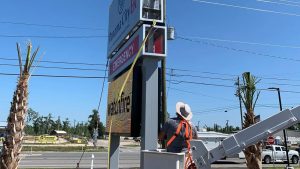
For an exterior digital sign, permitting and engineering should be considered before the final design goes into production.
Sign requirements can vary by municipality, zoning district, property, sign type, dimensions, placement, and illumination.
That means a digital display allowed at one retail property may not automatically be approved at another.
Vintage Sign & Light’s Florida signage permit guide explains that local approval may address sign codes, zoning rules, safety requirements, placement, and other project conditions.
Landlords and shopping centers may also have their own sign criteria covering size, placement, materials, branding, and illumination.
Wind Requirements in the Florida Panhandle Are Site-Specific
Northwest Florida’s wind requirements deserve particular attention, but there should not be one blanket wind-speed number used for every digital sign project.
The Florida Building Commission states that the 8th Edition (2023) Florida Building Code references ASCE 7-22 for wind criteria. Its published guidance also notes changes to wind-speed maps in the Florida Panhandle and explains how site-specific wind speeds may be determined. Because local requirements can vary, the Commission recommends confirming the applicable criteria with the local jurisdiction.
This is why an exterior digital display should be engineered around the actual property rather than a generic “hurricane-rated” marketing claim. Vintage Sign & Light provides sign engineering coordination for structural supports, wind loads, electrical needs, permit documentation, and installation planning.
What Should You Prepare Before Choosing a Digital Display?
Start with basic information about your property and visibility goals. You do not need to know the exact display model or pixel pitch before contacting a sign company.
Gather:
- Property address: This helps identify the jurisdiction and property conditions.
- Photos of the storefront and existing signs: Include wider photos, not only close-ups.
- Customer approach photos: Show what someone sees while entering the property or approaching from the road.
- Proposed display location: Identify whether you want to modify an existing sign or install something new.
- Brand files: Provide your logo and current colors when available.
- Content goals: Explain whether you plan to promote offers, events, services, announcements, or other messages.
- Landlord criteria: Include any shopping-center or lease signage requirements.
- Desired timing: Share upcoming openings, renovations, or other project dates.
A professional sign site survey can then document measurements, photos, electrical information, access conditions, and other field details used during design, engineering, permitting, manufacturing, and installation.
Common Mistakes to Avoid When Choosing Retail Digital Signage
Choosing a digital display based on one specification alone can lead to poor visibility, unnecessary costs, or installation challenges. Avoid these common mistakes by evaluating the display as part of the complete sign system, including the site, structure, content, permitting, and long-term use.
Choosing From Specifications Before Reviewing the Site
A spec sheet cannot tell you where a tree blocks the sign, how traffic approaches the property, or whether the existing structure can support the proposed installation. Start with the property.
Paying for Resolution Customers Will Not Notice
Tighter pixel pitch can provide greater detail, but that detail only helps when customers are close enough to see it. Match resolution to viewing distance rather than assuming smaller pixel pitch always means a better investment.
Treating the Digital Display as a Standalone Purchase
The display may require structural work, electrical planning, a supporting sign, permitting, engineering, installation equipment, and future access for maintenance. Compare the complete project rather than only the LED hardware.
Designing Content After the Sign Is Installed
Think about your messages before selecting the system. The size and location should support the kind of communication your business plans to use regularly.
Assuming Every Florida Property Has the Same Requirements
Local sign rules and structural conditions vary. Verify the requirements for the actual property before fabrication begins.
Frequently Asked Questions
What pixel pitch should I choose for an outdoor LED sign?
The right pixel pitch depends mainly on viewing distance, display size, traffic speed, and how much detail your messages require. A sign professional can compare those factors before recommending a configuration instead of simply choosing the tightest pixel pitch available.
Can I add a digital display to an existing monument sign?
Sometimes. The existing structure, dimensions, electrical system, foundation, access, local sign code, and engineering requirements need to be reviewed before confirming whether integration is practical.
Can Watchfire digital signs be updated remotely?
Yes. Watchfire’s Ignite OPx is a cloud-based content management platform that allows users to create, schedule, and publish display content remotely through an internet-connected device.
Do digital signs require permits in Northwest Florida?
Most permanent exterior digital sign projects should be reviewed for applicable local permitting, zoning, and engineering requirements before installation. Exact requirements vary by location, so the municipality and property need to be evaluated individually.
Expert Tip
Before your site survey, take one photo of the proposed sign location from the point where customers first notice your property. Then take the same photo during strong daylight and after dark. Those views can reveal obstructions, glare, competing signage, and realistic viewing conditions that are easy to miss when standing directly beside the sign.
Choose the Display Around Your Property
Choosing the right retail digital display comes down to matching the sign to the way customers actually experience your property.
Start with viewing distance, traffic, sign placement, content needs, and the existing site. From there, determine the appropriate display size, pixel pitch, structure, electrical needs, engineering, and permitting.
Vintage Sign & Light is an authorized Watchfire dealer and provides Watchfire digital display projects alongside sign design, site surveys, engineering coordination, permitting support, manufacturing, installation, maintenance, and repair.
Planning a digital display for your retail property? Start your project with Vintage Sign & Light and send the team your property address, site photos, current signage, and visibility goals.
Vintage’s process begins with understanding the project and site before moving through survey, proposal, applicable engineering and permitting, production, and installation. See how the Vintage Sign & Light signage process works.